What “bring your own key” means
Most AI apps sell you a subscription and route your messages through their own servers. A BYOK app works the other way around: you create an API key with the AI provider, paste it into the app, and the provider bills you directly for the tokens you use. The app is just the interface.
Ensor is built entirely around this model. There is no Ensor account, no Ensor subscription and no Ensor server. Your iPhone talks to the provider you chose — nothing else.
Why use your own API key
- Pay for what you use. No monthly plan — if you chat lightly, API usage can cost less than a subscription.
- Pick any model. Use the latest models from each provider, or hundreds of models through OpenRouter.
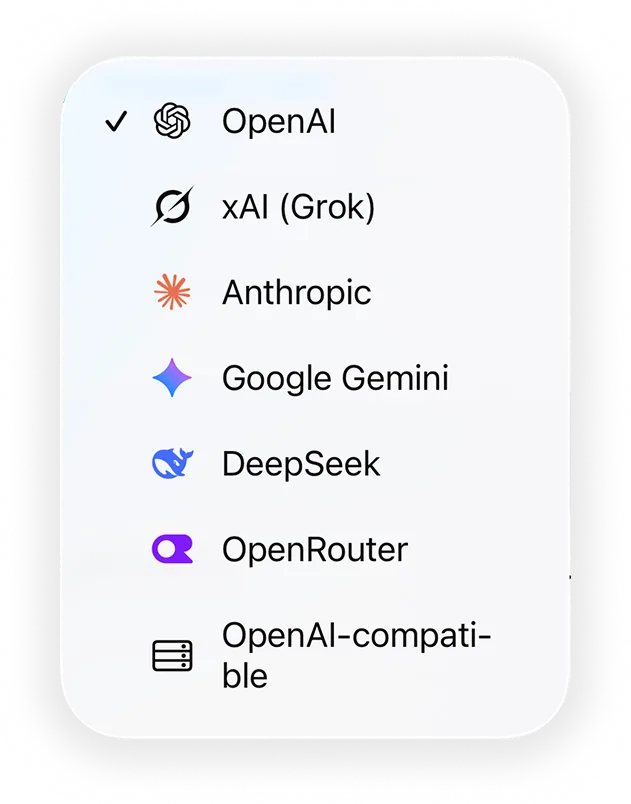
- One app for every provider. OpenAI, Claude, Gemini, Grok and DeepSeek side by side, even in the same group chat.
- Your key stays on your iPhone. Keys live in the Apple Keychain and are sent only to the provider they belong to.
- No account to create. Open the app, paste a key, chat.
How to set it up
- Create an API key with your provider — for example in OpenRouter settings, the OpenAI Platform, the Anthropic Console or Google AI Studio.
- Download Ensor from the App Store and open Contacts.
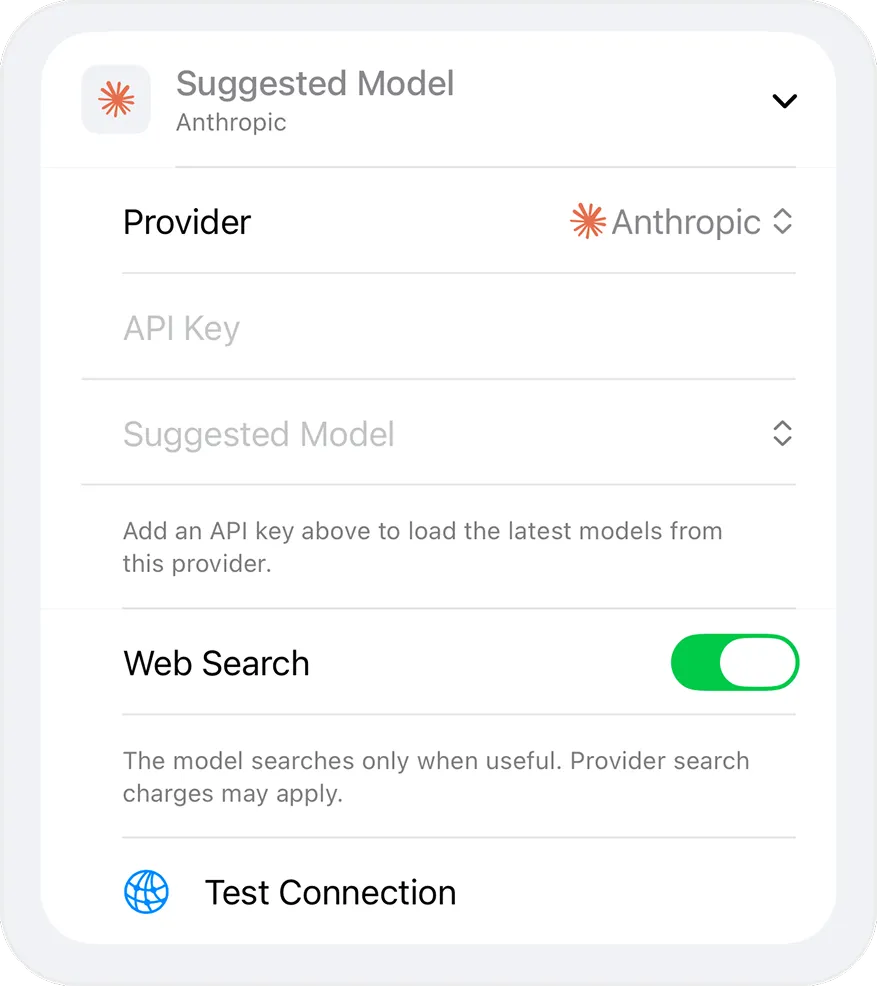
- Tap an AI’s avatar (or create a new AI), choose a Provider and paste your API Key.
- Pick a model. Ensor loads the latest models available to your key.
- Tap Test Connection, save, and start chatting.
Supported providers
Every provider below works with your own key. Open a provider for setup details.
All providers support streaming replies. Image and PDF reading also depends on the model you choose.
What it costs
Ensor is free. Each provider charges your API account for the tokens you use, at its own prices. Web search, when enabled, may be billed separately by the provider. Ensor shows the token usage that providers report for each AI contact, but your provider’s dashboard is the source of truth for billing.
Keeping your key safe
- Keys are stored in the iPhone Keychain with a this-device-only setting, never in the app database.
- Keys are not shown again after saving — the editor only shows “API key configured”.
- Switching an AI contact to a different provider requires a new key.
- Exports never include keys.
Frequently asked questions
What is a BYOK AI app?
BYOK means “bring your own key”. Instead of paying the app for a subscription, you paste an API key from an AI provider such as OpenAI, Anthropic, Google or OpenRouter, and the provider bills you for what you use. Ensor is a BYOK AI chat app for iPhone.
What is the best way to use an API key on iPhone?
Use an app that stores the key in the iPhone Keychain and sends requests directly to the provider. Ensor does both: it is free, needs no account, and has no server in between your iPhone and the provider.
Can I use one API key for several AI contacts?
Yes. Each AI contact stores its own key, so you can paste the same key into several contacts or use different keys for different providers.
What happens to my key if I switch provider?
Ensor asks you to enter a new key whenever you switch an AI contact to a different provider, so a key is never sent to the wrong company.
Is my API key included when I export?
No. Exports of AI contact settings and chats never contain API keys. You re-enter keys after importing on another device.
Is there an OpenRouter app for iPhone?
Ensor is a free iPhone app that works as an OpenRouter client. Paste your OpenRouter API key, pick any model slug, and chat. Requests go straight from your iPhone to OpenRouter — there is no Ensor server in between.
Can I use my OpenAI API key on iPhone instead of ChatGPT Plus?
Yes. Ensor is a free iPhone app that uses your own OpenAI API key, so you pay OpenAI per API usage instead of a monthly ChatGPT plan. Note that an API key does not include ChatGPT app features such as voice mode or cloud chat history.
Can I use the Claude API on iPhone?
Yes. Add your Anthropic API key to an AI contact in Ensor, choose a Claude model, and start chatting. Ensor calls the Anthropic Messages API directly from your iPhone.
How do I use a Gemini API key on iPhone?
Create a key in Google AI Studio, then paste it into an AI contact in Ensor and pick a Gemini model. Your key stays in the iPhone Keychain.
Can I use the Grok API on iPhone?
Yes. Paste your xAI API key into an AI contact in Ensor and choose a Grok model. Requests go directly from your iPhone to xAI.
Is there an iPhone app for the DeepSeek API?
Ensor is a free iPhone app that works with your own DeepSeek API key. Add the key to an AI contact, pick deepseek-chat or deepseek-reasoner, and start chatting.
Can I use a custom OpenAI-compatible endpoint on iPhone?
Yes. Choose OpenAI-compatible as the provider in Ensor, enter your HTTPS base URL, model ID and API key. Ensor sends Chat Completions requests to that endpoint directly from your iPhone.